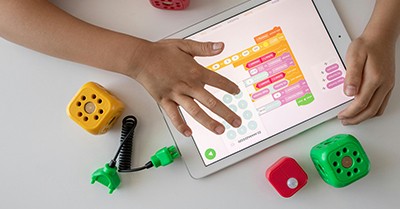
Teaching coding to children can be both fun and educational, providing them with essential skills for the future. The following article provides information on Approaches To Teaching Coding, Benefits Of Teaching Cody To Children, Activities To Teach Coding, Introducing Coding In Play-Based Learning, Coding Resources and more.
Approaches To Teaching Coding
1. Play-Based Learning
-
Method: Integrate coding concepts into play to make learning fun and relatable.
-
Example: Using toys like robots that children can program with simple commands.
2. Hands-On Activities
-
Method: Provide hands-on experiences to reinforce coding concepts.
-
Example: Building simple circuits with conductive materials or creating patterns with LEGO bricks.
3. Storytelling and Animation
-
Method: Use storytelling and animation tools to teach coding in a creative way.
-
Example: Programs like ScratchJr allow children to create animated stories by coding the actions of characters.
Benefits of Teaching Coding to Children
-
Enhances Problem-Solving Skills: Coding helps children learn how to break down tasks and find solutions systematically.
-
Fosters Logical Thinking: Understanding coding concepts develops logical reasoning skills.
-
Encourages Creativity: Coding allows children to create their own stories, games, and animations.
-
Builds Persistence and Patience: Debugging code teaches children to be persistent and patient when solving problems.
By incorporating these tools, activities, and approaches, you can make coding an enjoyable and educational experience for young learners.
Activities To Teach Coding
1. Unplugged Coding Activities
-
Sequencing Games: Arrange picture cards in the correct order to complete a task or tell a story.
-
Directional Commands: Set up a maze and use simple commands to guide a character or toy through it.
2. Digital Storytelling
-
Activity: Use apps like ScratchJr to create animated stories.
-
Benefit: Encourages creativity and helps children understand sequences and events.
3. Robotics
-
Activity: Program simple robots like Bee-Bot to perform tasks and navigate mazes.
-
Benefit: Hands-on learning that teaches sequencing, problem-solving, and logical thinking.
4. Pattern Recognition
-
Activity: Create patterns using objects like colored beads or blocks.
-
Benefit: Helps children understand the concept of sequences and patterns, which are fundamental to coding.
Introducing Coding In Play-Based Learning
Introducing coding in play-based learning is a fantastic way to engage young children in foundational programming concepts while they have fun. Here are some creative and effective activities that blend coding with play:
1. Sequencing Cards
-
Activity: Create a sequence of picture cards to tell a story or complete a task.
-
Example: Have cards that illustrate the steps to wash hands: wet hands, apply soap, scrub, rinse, and dry. Ask children to arrange them in the correct order.
2. Human Robot Game
-
Activity: One child plays the "robot," and others give commands to guide the robot through a series of actions.
-
Example: Commands like "move forward three steps," "turn right," "pick up the toy," help children understand sequencing and direction.
3. Pattern Making with Beads
-
Activity: Use colored beads to create and identify patterns.
-
Example: Make a pattern with beads like red, blue, red, blue, and ask children to continue the pattern or create their own.
4. Directional Maps
-
Activity: Create a map on the floor using tape or paper, and use toys or figures to follow the path.
-
Example: Children can place toy cars on the map and follow arrows or symbols to navigate from start to finish.
5. Coding Bracelets
-
Activity: Use beads or colored bands to create bracelets with coded patterns.
-
Example: Assign colors to different commands (e.g., red = move forward, blue = turn right) and make bracelets that represent a series of commands.
6. LEGO Coding
-
Activity: Use LEGO bricks to teach basic coding concepts by creating patterns and sequences.
-
Example: Build structures following specific rules, like alternating colors or shapes, or creating a sequence that mimics a simple algorithm.
7. Story Sequencing
-
Activity: Use story cards to create a narrative sequence.
-
Example: Provide cards with different parts of a story and ask children to put them in the correct order, like events from "The Very Hungry Caterpillar."
8. Obstacle Course
-
Activity: Set up a simple obstacle course and give children verbal instructions to navigate through it.
-
Example: Use commands like "crawl under the table," "jump over the pillow," and "walk around the chair" to reinforce sequencing and direction.
9. Coding with Cups
-
Activity: Stack plastic cups in specific patterns based on given instructions.
-
Example: Provide a sequence like "stack three cups, place one on top, stack two more beside," and have children follow the instructions to build the structure.
10. Binary Bracelets
-
Activity: Introduce the concept of binary coding with simple bead patterns.
-
Example: Use two colors of beads to represent binary digits (e.g., white = 0, black = 1) and create patterns or messages using binary code.
Benefits of Coding Activities
-
Enhances Problem-Solving Skills: Children learn to think logically and solve problems step-by-step.
-
Fosters Creativity: Activities encourage creative thinking and the ability to design and execute plans.
-
Develops Sequencing and Directional Skills: Children learn the importance of order and direction in completing tasks.
-
Encourages Collaboration: Many activities involve working together, promoting teamwork and communication.
These unplugged coding activities are a great way for young children to understand coding concepts in a fun and hands-on manner, without the need for screens or digital devices.
Further Reading
STEM For Toddlers
Sensory Processing In The Learning Environment
Teaching Math Through Play


 Open ended questions cannot be responded to with one word answers such as yes or no. These types of questions enables a child to provide
 During your child’s preschool years, an important milestone begins to emerge. This is the development of pre-writing skills. Pre-writing skills are used to encourage, develop
 An Acknowledgment of the Country is a way of showing respect for the Traditional Owners and can be given by both non-Indigenous people and Aboriginal
 Open ended materials enables children to play freely. They are objects that have no rules to follow, use or function. Raw materials that can be
 Language plays an important role in a child’s development. It enables a child to communicate effectively with their family, learn at school, socialize with friends,
 Like adults, children have to deal with their own stress in life. Moving house, starting a new school, preparing for a new sibling - these are
 Playdough is such a versatile material. It provides numerous benefits to children as they manipulate it, it is safe and soothing and provides children with
 Teaching children about sustainability enables them to appreciate and respect the natural environment. Early childhood services can provide meaningful hand on learning experiences in order
 Recycling is an important concept that teaches children to care for the environment. It encourages children to be responsible and show a growing appreciating for
 Incursions provide children with the opportunity to explore meaningful learning experiences in the comfort of their early childhood service. The following provides a directory of